Project Diary: NYT Daily Newsletter
One of the great things about living in New York is that the Times is technically your local paper. It’s pretty cool to have one of the most prestigious newspapers in the world to provide you all the neighborhood hot spots, gossip, and restaurants. That said, opening the NYT can sometimes be slightly distracting…national politics, international news, and more flood the homepage when all I’m trying to see is where to get the best bagel in UWS.
I wanted to personalize my reading experience just a bit more - this way, I could still read through the great work of the NYT while focusing on my interests: local NYC food, culture, and news mixed with just a bit of business and tech coverage I need for work.
I decided to build something that did just that. Using the NYT API, pythonanywhere, Gmail App Passwords, and trial-and-error debugging, I built a personalized daily newsletter that sends me one NYT article each morning—automatically curated based on the day of the week.
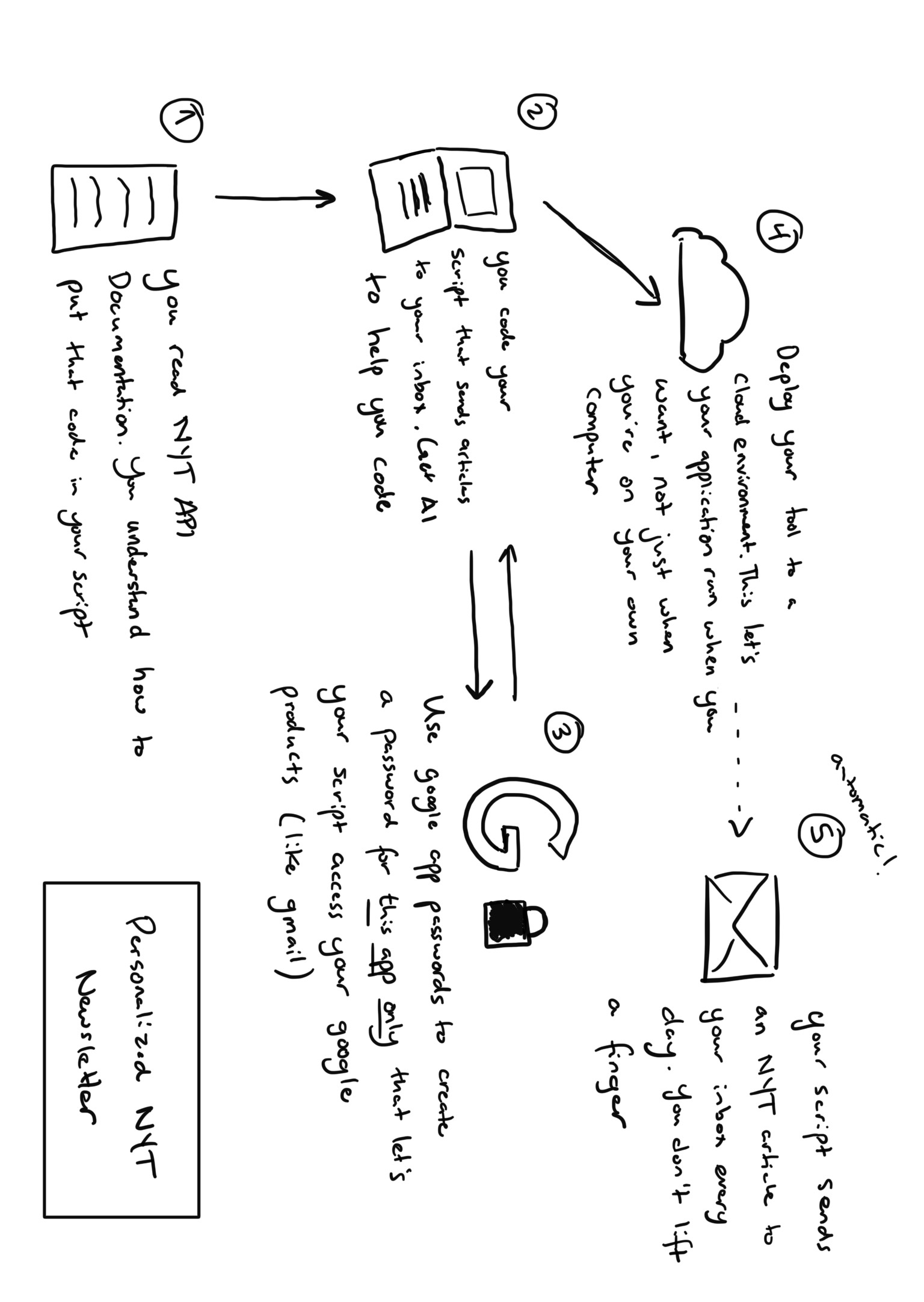
Here is how it all works together:
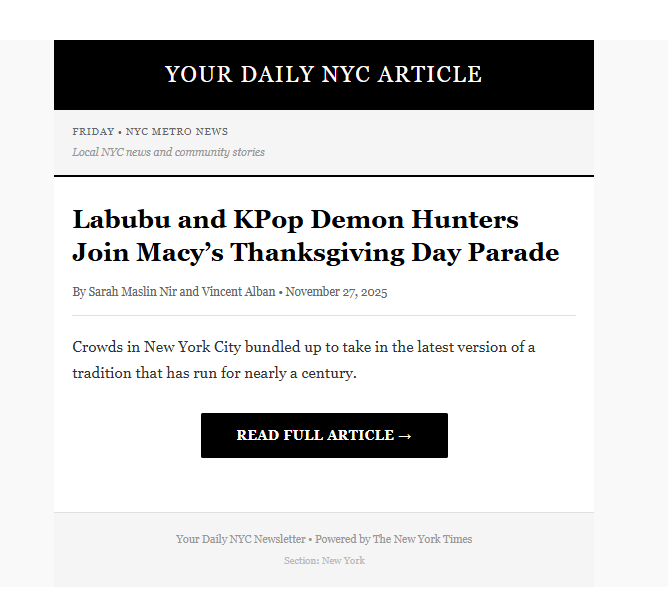
And here is the type of article I receive each morning:
- Monday: Top national business story
- Tuesday: Top national tech story
- Wednesday: NYC Food and Dining article
- Thursday: NYC Arts and Culture article
- Friday: NYC Metro News Article
- Saturday: Top Op-Ed story
- Sunday: Most viewed article of the week
Could I just open the Times and scroll? Sure—and I still do. But I find it beneficial to start the day with one focused article rather than scanning endless headlines - One article, one topic, delivered to my inbox each morning, and maybe I explore the Times further from there. Plus, I wanted to build something I thought I would actually use — and a personalized newsletter seemed like a good excuse to get hands-on.
That is my WHY…I now had to think through the HOW. I could identify three primary pieces that would need to fit together in order to build this out:
- I would need to use the NYT APIs to get the articles I wanted to read
- I would need to work with Gmail to receive those articles in my inbox
- I would need some level of cloud compute to automate this process for me
The NYT APIs
Getting started with the NYT APIs was pretty easy. You sign up for a nyt developer account and create an app. In my case, the app was the NYT daily newsletter. Your app will provide you your API key, which you can use for any of the numerous APIs the NYT offers.
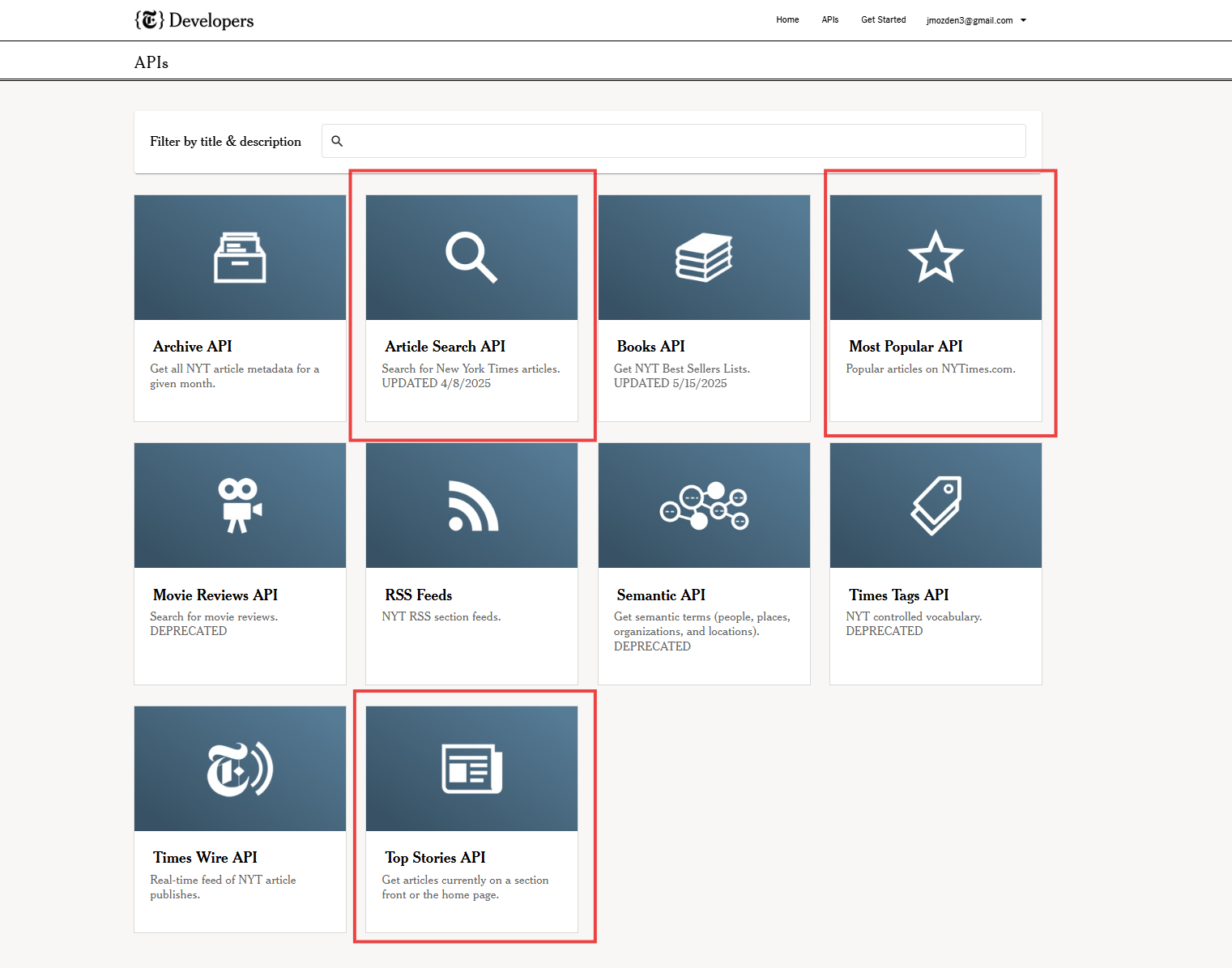
A few of these APIs are deprecated, and some aren’t super relevant - while every use case is different, the most relevant APIs for most projects are likely the following (which I used for my project):
- Article Search API: By far the most well-documented and robust NYT API. Used for NYC-focused days (Wed/Thu/Fri) since it supports location filtering
- Top Stories API: A very basic API that returns an array of articles currently on a specified section. Used for national news to get current business/tech/opinion pieces
- Most Popular API: Pulls the most popular article on NYT for a specified time period. You can define ‘most popular’ based on most emailed, most shared, or most viewed.
Article Search
The Article Search API was my choice for NYC-specific content. It’s the most robust of the three, with extensive filtering options for location, desk, and date ranges.
For my Wednesday, Thursday, and Friday articles, the config looks like this:
# 7-Day Rotation Schedule

WEEKLY_SCHEDULE = {
    2: {  # Wednesday
        "name": "NYC Food & Dining",
        "api": "article_search",
        "filter": 'desk:"Dining" AND timesTag.location:"New York City"',
        "description": "NYC restaurant reviews and food scene"
    },
    3: {  # Thursday
        "name": "NYC Arts & Culture",
        "api": "article_search",
        "filter": 'desk:"Culture" AND timesTag.location:"New York City"',
        "description": "Theater, museums, and cultural events"
    },
    4: {  # Friday
        "name": "NYC Metro News",
        "api": "article_search",
        "filter": 'desk:"Metro"',
        "description": "Local NYC news and community stories"
    },
}
The filter parameter is crucial—it determines what articles get returned. But first, I had to get it working…
My initial attempt with Claude-generated code returned zero articles. Every single query came back empty. I knew this was wrong — there had to be NYC dining and culture articles. So I went back through my conversation with Claude and noticed something I’d initially overlooked:
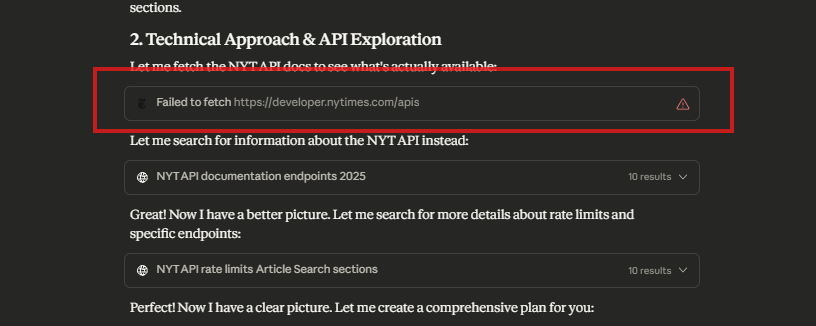
Claude couldn’t access the actual NYT developer documentation. The site blocked it (likely to prevent AI scraping of their content). Instead, Claude relied on older, incomplete sources. I pulled up the documentation myself and compared it line-by-line with the generated code. There it was:
# What Claude generated (wrong):
'fq': 'news_desk:"Metro"' # returns 0 articles

# What actually works
'fq': 'desk:"Metro"' # Returns 10,000+ articles
The field name was desk, not news_desk. One word. Completely broke the query.
The lesson learned here: AI can generate code quickly and often accurately, but it still hits walls — especially with documentation behind paywalls or anti-scraping protections. You need to understand enough to debug when things don’t work as expected. I only caught this because I knew to check the actual API response structure.
Once that was fixed, the next challenge: filtering for NYC content specifically.
I tried several approaches:
section_name:"New York"→ 0 resultsglocations:"New York City"→ 0 resultsgeo_facet:"New York"→ 0 results
Finally, buried in the filter query examples (not the main field documentation), I found:
timesTag.location:"New York City"
That unlocked everything:
- Dining + NYC: 1,251 articles ✓
- Culture + NYC: 977 articles ✓
- Metro desk: 10,000+ articles ✓
Once those were resolved, it was off to the races. The article search API lets you filter by so much more…I just tailored it to my needs. It would be easy for others to tinker with those parameters to find articles they were interested in.
Top Stories
For all my non-local articles, I just wanted to know what the top stories were for industries I am interested in - in this case, that is business and tech (there are many more options than just that). What I didn’t originally understand, however, was what ‘top story’ meant. The documentation defines it as this…
“The Top Stories API returns an array of articles currently on the specified section (arts, business, …).”
What does that mean? Currently on the specified section of what? And where on that section?
In order to find this out , I tested two things:
- Run the API and see what it returns
- Look at that particular section on the nytimes.com and see where those API articles are.
To do that, I run the top stories for business:
curl "https://api.nytimes.com/svc/topstories/v2/arts.json?api-key=mykey"
which returns the following:
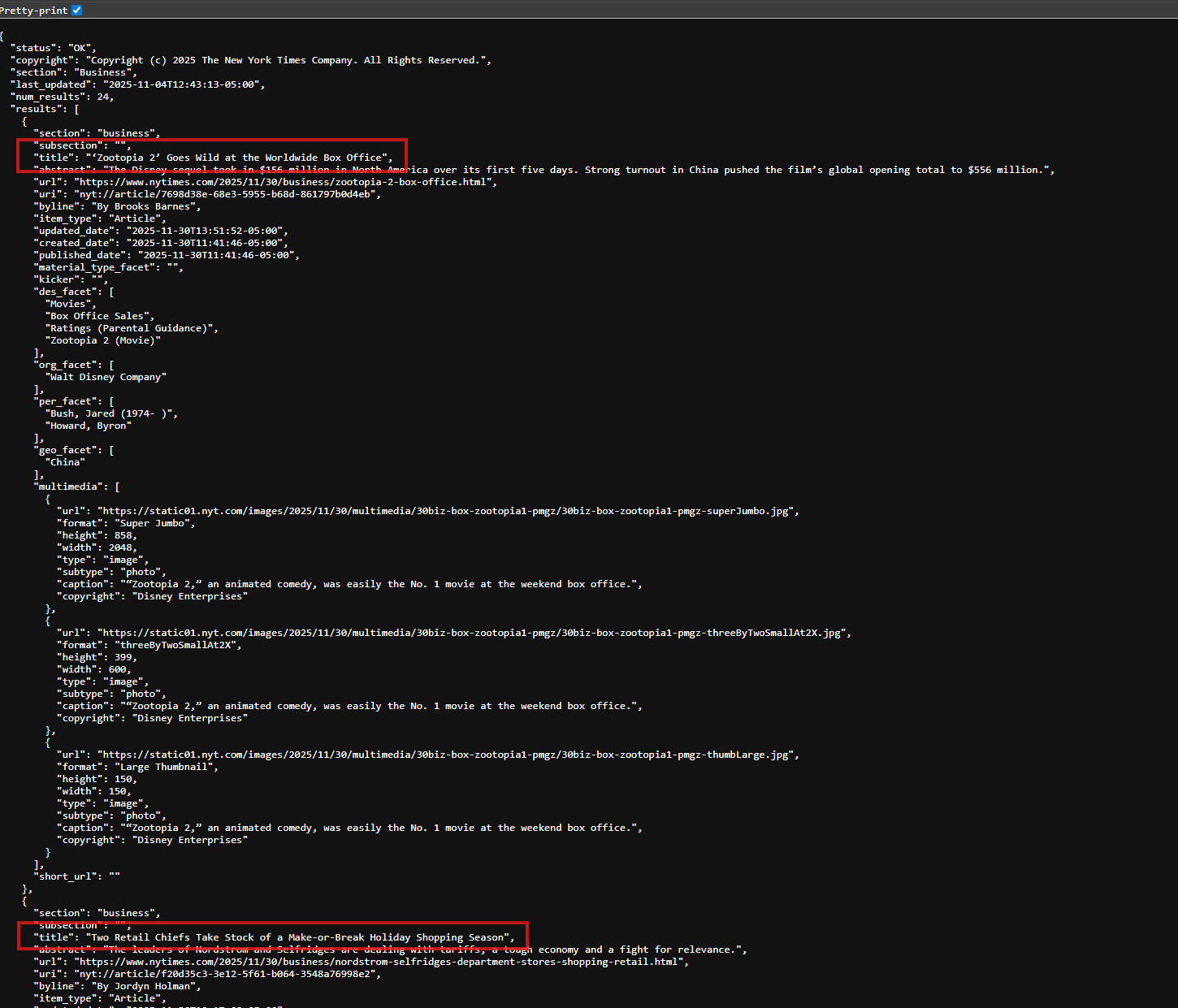
While there are many more articles listed, the api returned two that we can see without scrolling down:
- ‘Zootopia 2’ Goes Wild at the Worldwide Box Office
- Two Retail Chiefs Take Stock of a Make-or-Break Holiday Shopping Season
So now it was time to find these articles on nytimes.com, which was relatively easy. I went to the business section and found the most recent articles.
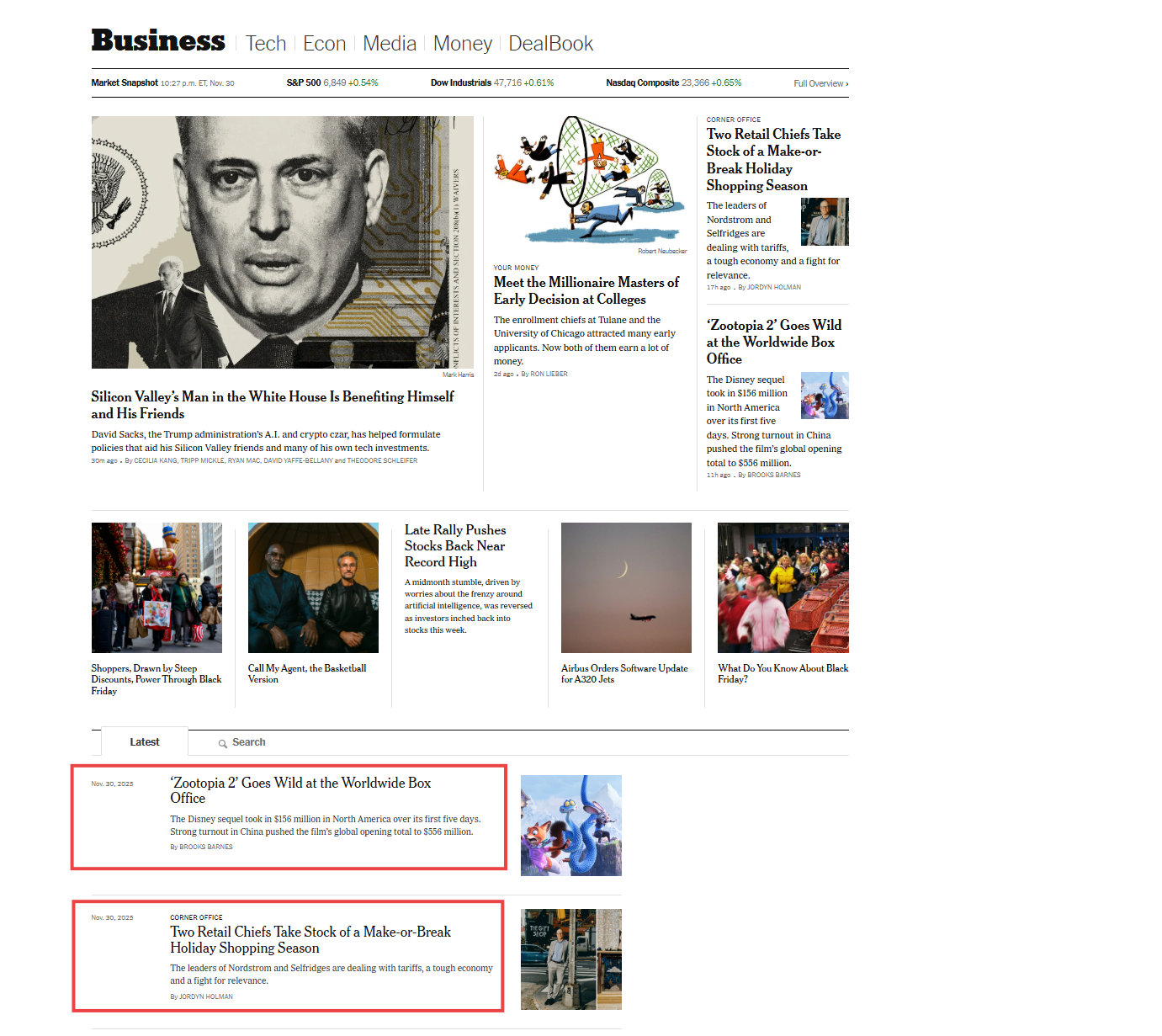
So, by the documentation’s description, it is exactly this - “articles currently on the specified section.” I expected “Top Stories” to mean something more…maybe front-page articles or the most prominent story on the page (like that “Silicon Valley’s Man in the White House” article with the big photo). Instead, it’s just the most recent articles published under “Latest” in that section.
Since I don’t want ALL the articles and just want one, I will simply pull the top story listed for that particular section at 8am, when the task is executed (in the example above, the email article sent to my inbox would be the one about zootopia 2). Does Zootopia 2 really qualify as a ‘top business story’? Not really — it’s no more important than the retail chiefs article below it. But they’re both recent, relevant business coverage. And that’s the key point: this API gives me current, editorially-vetted articles in my chosen topics. It’s not perfect, but it works.
WEEKLY_SCHEDULE = {
    0: {  # Monday
        "name": "Business News",
        "api": "top_stories",
        "section": "business",
        "description": "Latest breaking business news"
    },
    1: {  # Tuesday
        "name": "Technology",
        "api": "top_stories",
        "section": "technology",
        "description": "Latest tech industry news"
    },
    5: {  # Saturday
        "name": "Opinion",
        "api": "top_stories",
        "section": "opinion",
        "description": "Top opinion and editorial pieces"
    }
}
This API is designed to return an array of stories, not just one. Ideally, I’d use the Most Popular API filtered by section — but that API doesn’t support section filtering. The Top Stories API was my best option for getting current business and tech articles. Good enough beats perfect when you’re trying to ship something that works.
Most Popular
I wanted to add the most popular story in a given week to my reading repetoire just because I want to see what everyone else is reading. This API is, by far, the most straightforward of the bunch - what is the most popular news story within the last 7 days. Since ‘most popular’ can be defined as most shared, most emailed, or most viewed, I had to decide what I wanted for my newsletter. While most shared and most emailed might be better for understanding engagement, I was simply trying to read what everyone else was reading. For that reason, I used the parameter of most viewed for this API call.
In this example call, you can notice how it says ‘viewed’ in the parameters. That could’ve been swapped with ‘shared’ or ‘emailed.’
curl "https://api.nytimes.com/svc/mostpopular/v2/viewed/1.json?api-key=yourkey"
Connecting the APIs to my Gmail inbox
While knowing how to call the NYT APIs and get the articles I want is cool, to make this application actually useful, I want to connect that data to something. I don’t want to just run this code and get the article in my IDE output. In this instance, I want to connect the articles called from the NYT APIs to my Gmail inbox.
In order to allow our API code to connect to my inbox, we need to use the Gmail SMTP, which allows emails to travel through Google’s servers. SMTP stands for standard mail transfer protocol - it’s how all emails travel across the internet. In our case, we want the emails we create (the email with NYT articles) to be sent to our inbox.
We connect our code to Gmail through Gmail App Password. You create a password just for this particular code. You can then plug in that information to the code below, that sets up the SMTP. Think of this like google creates a password just for this project , and then you plug that password into the code.
# Connect to Gmail's SMTP server
server = smtplib.SMTP_SSL('smtp.gmail.com', 465)

# Log in with your email and app password
server.login(EMAIL_FROM, EMAIL_PASSWORD)

# Send the email
server.send_message(msg)
Since SMTP is how emails travel, Gmail provides an SMTP server you can use, and App Passwords let you connect securely without exposing your real Google password.
This is the same flow shown in the architecture diagram at the beginning of this article — the Python script bridges the NYT APIs and your inbox, formatting article data into readable HTML emails.
Deployment
So we have now written code that calls the NYT articles I want, formats it as an email, and set up the connection that allows those emails to be sent to inbox. But we’re not quite done.
If I let this as is, I would need to get on my computer every day, run this script, and then the article will be sent to my email. While that is cool, I don’t want to do this manually every day. I want an automated email sent to my inbox, similar to email newsletters you might sign up for elsewhere.
We are going to do this by deploying our script to the internet. Our code currently runs on our local computer, the one we are literally using. But, if we instead put this script on another computer, perhaps one that was ALWAYS on and one that could run certain things at certain times, that could help us run this script automatically.
This is what deployment does - you upload your code somewhere and another computer runs it. That is how applications are always running - we might code them on our computers, but that code is uploaded to computers (often time hundreds, if not thousands of computers) somewhere else in the world. When you hear of cloud companies like Microsoft , Amazon, and Google, this is a core part of their business - they host your applications in the ‘cloud’ - which really just means they host your stuff on their servers somewhere.
For this application, pythonanywhere worked really well - pythonanywhere’s free version gets me 512mb of storage, one daily cron job, and enough compute to run my script, which is all I need. I’d recommend pythonanywhere for anyone that has a lightweight application that doesn’t need more than one automated task a day.
What I Learned
Could this be built with no-code tools (Loveable, Replit) or a different tech stack? Absolutely. But building it myself taught me things I wouldn’t have learned otherwise:
1. AI has blind spots — you still need to know fundamentals to catch them
Claude couldn’t access the NYT documentation and confidently gave me broken code (news_desk instead of desk). I only caught it because I understood how to read API documentation and debug when things didn’t work.
Even as AI gets better, this won’t change: you need to understand how systems work. AI can generate code, but if you can’t read documentation or debug when things break, you’re stuck.
2. Architecting solutions is still your job
AI can implement once you tell it what to build. But I still had to decide:
- Which of three APIs to use for each day
- That
timesTag.locationworks when other location fields don’t - How to connect Gmail SMTP to my script
- Where to deploy and how to automate it
Knowing how pieces fit together and making those architectural decisions — that’s what makes you effective with AI. You need to have the strategic vision and decision-making skills, but AI executes. (My old coworker Dan Giannone has a really good post about this thought you can find here)
3. Hands-on keeps you sharp and up-to-date
Being hands-on keeps you on top of the latest tech stack, which helps with the point above. I learned PythonAnywhere is perfect for lightweight automation. I learned about API rate limits the hard way. I learned the quirks of each NYT API. Each project teaches you new tools and patterns that transfer to the next one.
The best way to learn is to build. Even if it’s “just” a daily email newsletter, you’ll learn something valuable in the process.