Lessons from TAing my favorite class
As someone who self-describes himself as a “liaison between technical and non-technical stakeholders” (OK mr. business man), I recently found a nice little short job for myself. This January, I was a teaching assistant for a class called “Programming Generative AI applications” at Columbia Business School, which I took last spring as a student.
From the syllabus…
“The focus of this course is to give you a working knowledge of what it takes to customize and assemble a customized generative AI application.”
That’s about as good as I could describe it. It’s about building AI applications.
Now, the “AI portion” goes two ways - it’s about integrating AI into applications (using OpenAI’s API) but also using AI to build (Cursor, Claude Code, etc.).
The class was only five days, 8 hours a day, and was broken up between course work and project work. Again, from the syllabus…
“About 50% of the class time will be devoted to a group project where you will, in small groups, build your own customized AI applications.”
My job as a teacher’s assistant wasn’t to teach, but to walk around and help each group during project time. What was cool about this job was that I got to go to each group, understand what they were building, why they were building it, and how they were building it.
Another unique part of this class is that it’s for beginners - you need very little, if any, tech knowledge before taking this class. Essentially, I got a firsthand look at what beginners build and how they do it.
After five days of watching (mostly) new techies build real AI apps, I came away with a few observations - some expected, and some that genuinely surprised me.
On The Tools
Cursor was the main coding tool of choice. While I think there are better coding products out there today (Claude Code cough cough) it was relevant for newbies to learn about IDEs (even if they aren’t around forever). Additionally, there are quicker ways to mock up applications using tools like Lovable or Base44; however, many of these students want to eventually work in tech firms, and again, it’s good to know how enterprises are shipping code today. If you want to eventually explore your own technical projects (i.e. OpenClaw right now) there is value in knowing the terminal, file stucture, etc.
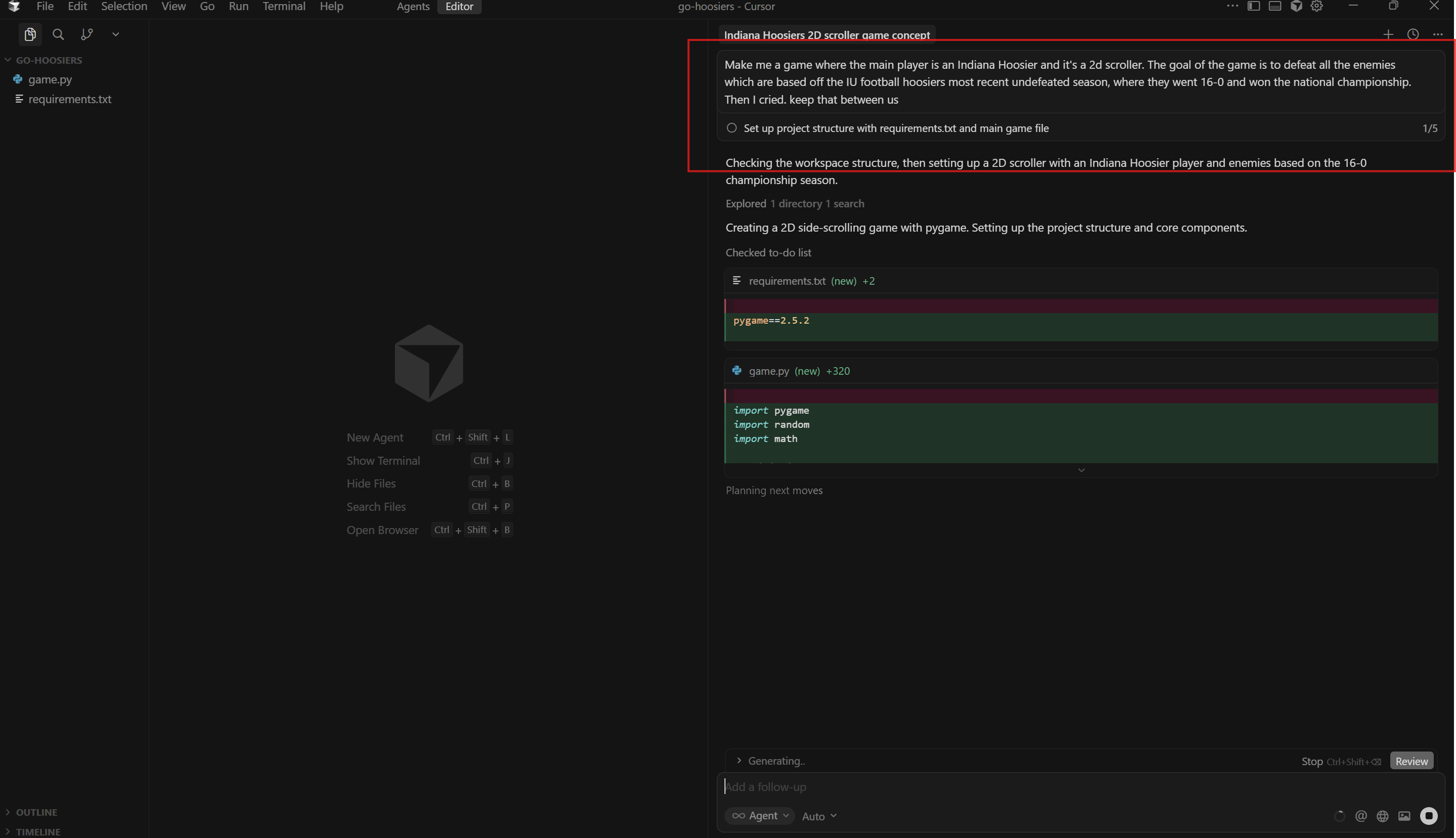
Mostly all the interaction in the IDE comes from working with the agents, not the code itself
OpenAI API was our token of choice. Most people know and understand OpenAI, and their API documentation is pretty easy to read through. We also make sure to set usage limits just in case something goes wrong.
Vercel blew up this year. Seldom did people use it last year. Ease of deployment, in my mind, has made one of the biggest leaps since last year. I’ve personally used Vercel, and it’s absolutely excellent - simply connect it with a repository and it will create a shareable link for you.
Supabase was the go-to tool for databases. Supabase itself was a great, easy to use option for application databases, but databases created a bit of a hassle for some student groups. More on that below.
If I were to create an application from scratch, as a beginner, I would generally follow this flow, which is what most students did.
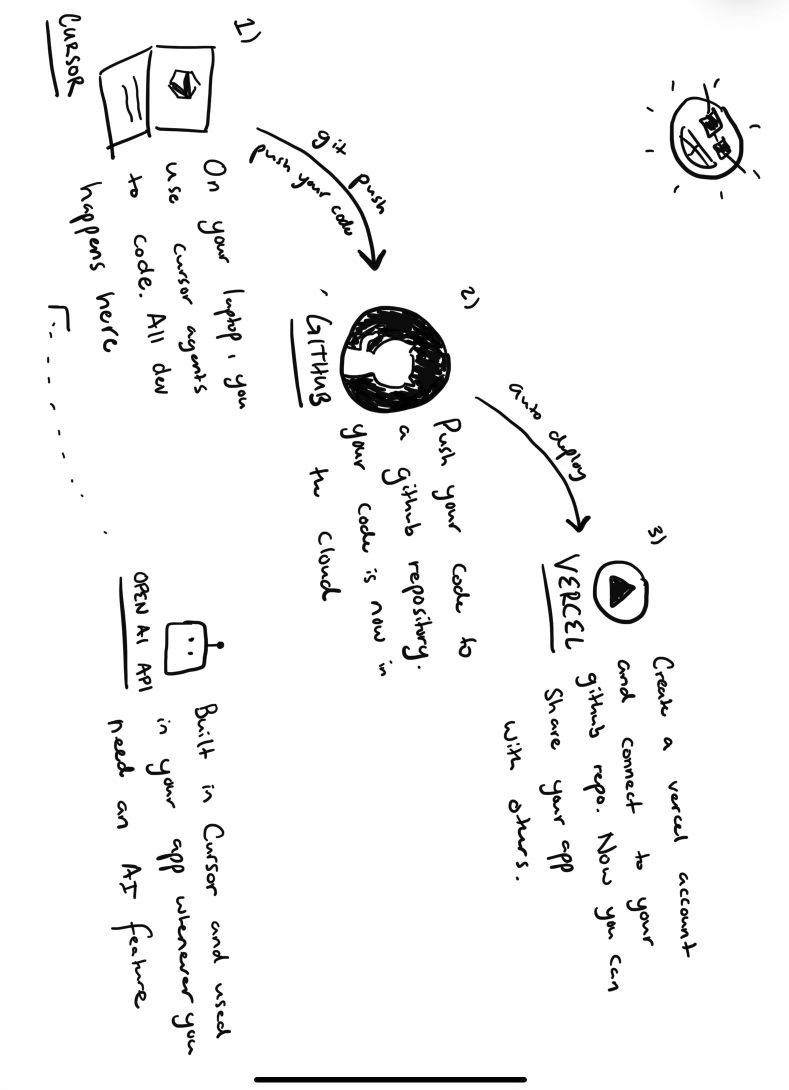
Code in cursor. Push to Github. Deploy to Vercel. You have a fully functioning, shareable application
On Getting Stuck
Troubleshooting is a skill. For beginners, most troubleshooting (primarily in Cursor) consisted of the following prompt - “plz fix.” Not really…but closer to that than an actual, effective troubleshooting message. Truthfully, I believe good troubleshooting comes down to a bit of experience. The best troubleshooting comes from knowing where the error is and what the expected behavior should be, not from immediately knowing what the error is. Most of my time as a TA was troubleshooting with teams during group work, and I didn’t know 80% of the issues upon initial review; however, all were solved because I knew how to troubleshoot. Learn that skill.
Reduce any need for unnecessary connections. For example, one team ran into issues connecting to their supabase database. Other teams had trouble connecting to multiple Google Calendars and Drives. This is a five day class where you showcase your product at the end - in my mind, there is no need to overcomplicate things, especially for demos. This is even true for a production grade application I’m trying to demo to investors - the first focus isn’t auth or connecting different data sources - it is making something functional and that sizzles. Keep it as simple as possible, even if that means using mock data locally.
Github, specifically branching, is really difficult for beginners to wrap their heads around. People worked in teams of 4-5, and for some of the teams that tried to do branches they ran into merge issues pretty much instantly. For this environment, it was better to have one person focus on the code at a time.
Some AI’s went rogue with output, and it takes someone with a bit of experience to see when it goes down weird little rabbit holes. For example, one group’s Cursor agent made a .md file for every single prompt they asked the machine. Know what you want, and if something seems to be taking too long or seems overcomplicated, it probably is. It’s good to prompt Cursor at the beginner discussing what you are trying to build, and request for simplicity over complication.
On The Class
In some of the theory parts of class, we used Google Colab. This worked really well since we didn’t run into any dependency issues that you might face with something like Jupyter Notebook. Even with the non-group work, we were getting hands on computer.
Last year, we discussed HTML. This year, we substituted that lesson for teaching deployment. That was a good swap of information, and with technology moving so quickly, I expect more changes to be made next year.
Virtual environments are slightly difficult to explain, especially as to why they are a best practice. That said, it was well worth it to help people quickly set one up for each project to minimize dependency issues, and basically give a one-minute explanation of why they are important, even if people don’t understand them 100%. It’s better for them simply to know that they are a best practice and less on why…at least for this class.
The five-day, intensive curriculum works amazingly well for this type of class. Lack of momentum is the biggest killer of technology projects - keeping everyone together for five days, working consistently toward a common goal created the best outputs. Dedication & Momentum > Time
To me, this is what AI education should look like - there is theory, but more than that, there is real world, project based work that pushes people to create. Creation is the top-level cognitive work, and more classes should focus their curriculum on analyzing, evaluating, and creating rather than remembering, understanding, and applying.
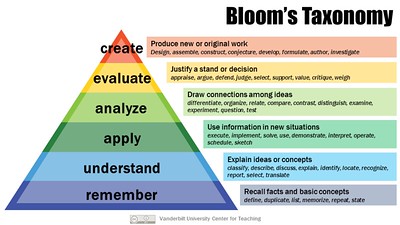
Bloom’s Taxonomy is a six-level hierarchy used to classify learning objectives by their cognitive complexity, moving from foundational memorization to higher-order critical thinking. Creation is the highest cognitive level because it requires students to synthesize all previous levels to produce original work
On the Bigger Picture
The reason this class is so beneficial is that everyone knows AI can help, but few know how to make it work for them. People need a little push to get from 0 to 1. This class teaches you, through both theory and project based work, how AI can help you build. Many students have taken their group projects and continued to work on them after the class or even created new products on their own time. Continue to learn more and more, just by doing.
The apps built this year were technically better than last year, and next year will be dramatically better than this year’s. That said, I still remember some stand out applications from last year’s class that I would use over some of today’s more recent applications.
Building, deploying, even databasing - that is more accessible than ever. But troubleshooting, knowing what you’re prompting toward, knowing what to build and why - that is still on us, and it makes all the difference.
The tools and execution got easier. The thinking did not. And that’s what we should continue to work on every single day.
Special thanks to Professor Johar and my trusty TA partners in crime Chitipat and Xilin. Wouldn’t have been as informative (and fun) without you